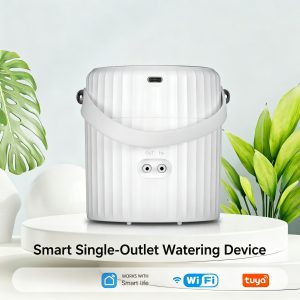
Smart WiFi Plant Watering Pump: A Must-Have for Indoor Plant Parents
If you’ve ever come home to a drooping pothos, a crispy fern, or a tragically over-watered succulent — you’re not alone. Studies show that over 60% of houseplants die from inconsistent watering, and most plant parents simply can’t keep up with the daily grind of checking soil, refilling cans, and remembering which plant likes what.
Enter the Smart WiFi Plant Watering Pump — a compact, app-controlled device that turns any container of water into a fully automatic, precision irrigation system for your indoor jungle. Pair it with a Tuya smart soil moisture sensor and your plants essentially water themselves.
In this guide, we’ll break down the features that make this little white bucket one of the smartest upgrades for plant parents in 2025 — and why it’s flying off the shelves of indoor gardeners worldwide.
Why Every Plant Parent Needs a Smart Watering Pump
Plant care is a relationship built on consistency — and humans are notoriously bad at it. Here’s what every plant parent struggles with:
- 🌿 Different species, different needs — Pothos, ferns, monsteras, succulents, orchids all want completely different watering schedules
- ✈️ Travel and vacations — Two weeks in Bali shouldn’t mean two weeks of dead plants
- 💼 Busy workdays — By the time you get home, the light has shifted and you’ve forgotten
- 🧠 Memory fatigue — “Did I water it Tuesday or Wednesday?”
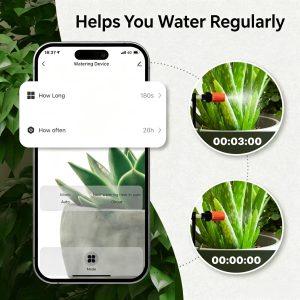
A smart watering pump solves all four problems in one device. The screenshot above shows the Smart Life app interface — set “How Long” to 180 seconds, “How often” to 20 hours, and the pump automatically runs the cycle. You can also see the live countdown (00:03:00) as the pump waters your plant on schedule, with the Mode set to Auto for hands-off operation.
5 Key Features That Set This Pump Apart
This isn’t just “a pump with WiFi” — every detail is built for real-world indoor use.
1. 🌿 Automatic Watering With the Smart Life App
The pump connects seamlessly to the Smart Life and Tuya Smart apps, giving you complete control from anywhere in the world. Set custom schedules by day, time, and duration. The pump follows your schedule to the minute — even when your phone is in another room or off entirely.
Real-world example: Set the pump to run for 60 seconds every 24 hours. Your pothos gets consistent moisture, your monstera stays lush, and you never have to think about it again.
2. 💧 Manual Mode for On-Demand Watering
Sometimes a plant needs a quick extra drink outside the schedule. Switch to Manual Mode directly on the device or in the app, and trigger a single watering cycle without disturbing your automated routine. The pump runs for the duration you set, then returns to the auto schedule on the next cycle.
3. 🔒 Child Lock for Family Safety
Pets and curious toddlers can change device settings with a single tap. The built-in Child Lock prevents accidental setting changes, so your carefully designed plant care schedule stays exactly how you set it. A long press on the device unlocks it when you need to make changes.
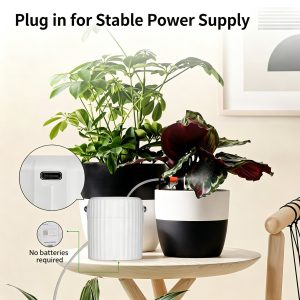
4. 🔌 USB-C Powered — No Batteries Required
No batteries to replace. No proprietary chargers. Just plug in any standard USB-C cable (5.0–6.0V) and let the pump run continuously. Use a power bank for ultra-flexible placement, or plug it into a wall adapter and forget about it. This is the kind of set-it-and-forget-it reliability indoor gardeners love.
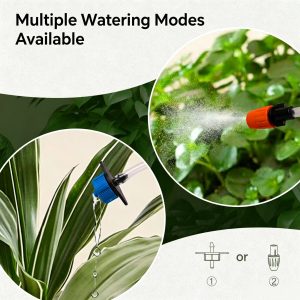
5. 🚿 Multiple Watering Modes — Drip or Spray
The pump supports two interchangeable nozzles:
- Drip mode (blue nozzle) — Slow, deep watering for established plants like monsteras, pothos, and peace lilies
- Spray mode (orange nozzle) — Gentle misting for humidity-loving tropicals like ferns, calatheas, and seedlings
Just swap the nozzle to match your plant’s needs. With a flow rate of 550 mL/min, the pump is calibrated for both styles without over-watering.
Pair With a Tuya Smart Soil Moisture Sensor — The Magic Combo
Here’s where the device goes from “smart” to genius. Pair this watering pump with a Tuya Smart Soil Moisture Sensor in the same Smart Life app, and you unlock fully automatic, soil-aware irrigation:
- 🌡️ Soil moisture sensor measures real-time moisture levels in the pot
- 📉 When moisture drops below your set threshold (e.g., 30%), it triggers the watering pump
- 💧 Pump runs for the exact duration you set to bring moisture back to ideal levels
- ✅ Pump stops automatically — no over-watering, no root rot, no waste
This is called a closed-loop smart irrigation system, and it’s the same technology used in professional greenhouses — now available for your living room at a fraction of the cost.
Real-world example:
- Set soil threshold to 35% (ideal for pothos)
- Set pump duration to 15 seconds per trigger
- Connect a 10L water reservoir with the included 5m tube
- Go on a 3-week vacation
- Come back to perfectly watered, healthy plants
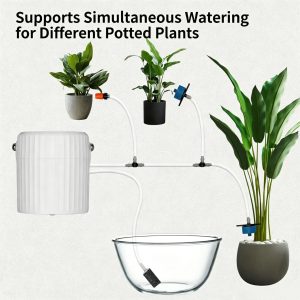
Water Multiple Plants Simultaneously
One of the most underrated features of this watering pump is its ability to water multiple potted plants at the same time with a simple 4-way splitter. The image above shows the pump connected to three different plants:
- 🪴 Pothos (left, gray pot)
- 🌿 Peace Lily (center, black pot)
- 🌱 Boston Fern (right, white pot)
All three plants get watered from the same reservoir (the clear glass bowl in the foreground) at the same time, with each outlet getting exactly the right amount of water for its specific plant. The built-in sponge filter in the reservoir keeps debris out of the pump, extending its lifespan and preventing clogs.
This makes the pump perfect for:
- 🌸 Balcony gardens with multiple hanging baskets
- 🪴 Indoor plant collections with 5–20+ plants
- 🌿 Greenhouse setups with rows of seedlings
- 🏡 Mixed-species displays where every plant has different water needs
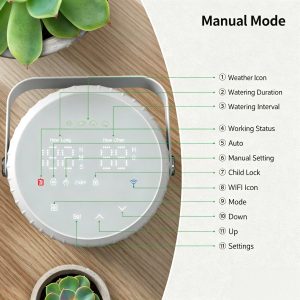
11-Settings Control Panel — Total Customization at a Glance
For users who prefer hands-on control, the pump features a circular LCD control panel with 11 customizable settings. As the diagram above shows:
- Weather Icon — Visual weather status display
- Watering Duration — Set how long each cycle runs (in seconds)
- Watering Interval — How often the pump runs (in hours)
- Working Status — Real-time pump activity indicator
- Auto — One-tap activation of automatic mode
- Manual Setting — Trigger a manual watering cycle
- Child Lock — Long-press to lock/unlock
- WiFi Icon — Connection status indicator
- Mode — Switch between Auto and Manual
- Down — Decrease value
- Up — Increase value
The bright LED display makes every setting easy to read at a glance — no need to dig into the app for basic adjustments. The 4 directional buttons (Set / Up/ Down / Mode) make navigation intuitive, even for users who aren’t tech-savvy.
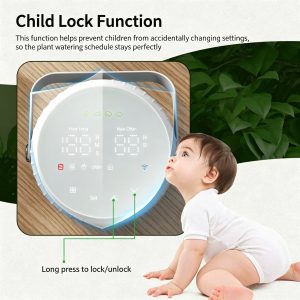
Child Lock Function — Built for Family Homes
If you have toddlers, curious kids, or pets in the house, the Child Lock function is essential. The image above shows the lock activated on the device display, with a “Long press to lock/unlock” indicator showing the simple operation. A long press on the device locks the control panel and app interface, preventing any accidental setting changes.
This means:
- 👶 Toddlers can’t change your carefully tuned watering schedule
- 🐕 Cats and dogs bumping into the device won’t trigger unwanted cycles
- 🧒 Kids playing near the device can’t accidentally disable the pump
- 🔒 Your settings stay exactly as you set them, week after week