Month: June 2026
How to Install a Video Doorbell Without Drilling: Complete DIY Guide
Target keyword: “How to install a video doorbell without drilling?” | Category: Installation Guides | Reading time: 6 min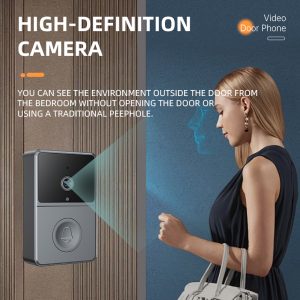
Worried about drilling holes in your door frame? Good news — you can install most modern video doorbells without a single screw. Here’s how.
Why Install Without Drilling?
Renters, apartment dwellers, and homeowners who don’t want permanent modifications all look for no-drill installation options. Drilling can:
• Void your rental deposit
• Damage brick, tile, or metal door frames
• Require professional tools and skills
• Leave unsightly holes if you move or upgrade
Method 1: Use an Adhesive Mount (Easiest)
What You Need
• Video doorbell with adhesive mount option (e.g., UOBX Video Doorbell)
• 3M VHB adhesive tape or industrial-strength double-sided tape
• Rubbing alcohol and cloth for cleaning
• Level (or use your phone’s level tool)
Step-by-Step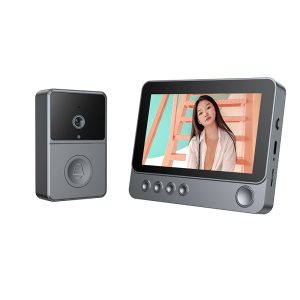
1. Clean the surface — Use rubbing alcohol to remove dirt and grease. Let it dry completely (2-3 minutes).
2. Mark the position — Hold the doorbell at eye level (about 55-60 inches from the ground). Use a level to make sure it’s straight.
3. Preheat the adhesive (optional) — Use a hair dryer to warm the adhesive tape for 10-15 seconds. This increases bonding strength.
4. Apply the mount — Press the adhesive mount firmly against the surface. Hold for 30-60 seconds of firm pressure.
5. Wait 24 hours — For maximum strength, let the adhesive cure for 24 hours before attaching the doorbell unit.
6. Snap on the doorbell — Attach your doorbell to the mount.
⚠️ Pro Tip: Adhesive works best between 10-40°C (50-104°F). Avoid installing in direct sunlight or below-freezing temperatures.
Method 2: Door Frame Mount (No Wall Marks)
Door-hanging brackets hook over the top of your door and hold the doorbell on the front side. Great for:
• Apartment doors
• Temporary installations
• Homes with brick or concrete walls
Method 3: Command Strips (Lightweight Only)
For lightweight non-WiFi doorbells (under 500g), Command strips work well. Use outdoor-rated Command large strips, clean surface thoroughly, press for 30 seconds, wait 1 hour before attaching.
Best Video Doorbells for No-Drill Installation
🥇 UOBX Wireless Video Doorbell
• Weighs only 380g — lightweight enough for adhesive mounts
• Built-in rechargeable battery — no wiring needed
• Includes adhesive mounting plate
• 7-inch built-in screen — no phone required
• No WiFi needed either — truly wireless
FAQ
Will adhesive damage my door?
High-quality adhesives like 3M VHB are removable. Heat with a hair dryer and slowly peel off. Residue can be cleaned with rubbing alcohol.
How long will adhesive hold?
With proper installation, up to 2-3 years outdoors. Check annually and replace if weakening.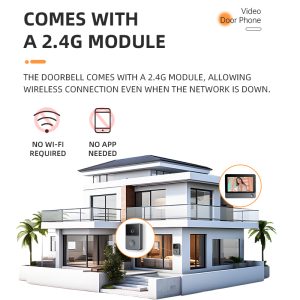
🔗 Ready for a drill-free doorbell? The UOBX Video Doorbell at Xingliaoshop.com — no tools, no holes, no mess.
Best Video Doorbell Without WiFi: What You Need to Know in 2026
Target keyword: “What is the best video doorbell that doesn’t require WiFi?” | Category: Smart Doorbells | Reading time: 5 min
Many homeowners want security without depending on home WiFi. Here’s everything you need to know about non-WiFi video doorbells and why they’re becoming a popular choice.
What Is a Non-WiFi Video Doorbell?
A non-WiFi video doorbell operates independently of your home internet network. Instead of relying on cloud services through WiFi, these doorbells use local storage (SD card or NVR) and can function as a standalone security device. They are ideal for rural areas with poor internet, vacation homes, or anyone who values privacy and reliability.
Can a Video Doorbell Work Without Internet Connection?
Yes, absolutely. While most mainstream brands (Ring, Nest, Arlo) require WiFi to function, there are specialized models like the UOBX Video Doorbell from Xingliao Tech that are designed to work completely offline. These devices:
Record video to a local SD card (up to 128GB)
Use a built-in screen to show visitors without any app
Support wired power or battery operation
Never send your footage to the cloud
💡 Key Insight: Non-WiFi doorbells are NOT “smart” doorbells that need your phone. They are all-in-one devices with an integrated screen — like a mini security station at your door.
Best Video Doorbell Without WiFi — Top Picks
🥇 UOBX Video Doorbell (Best Overall)
This is currently one of the best options on the market for non-WiFi use. Key features include:
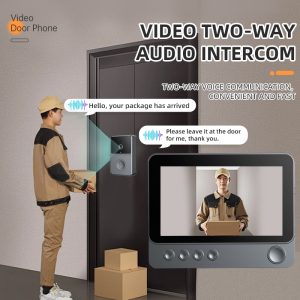 7-inch HD display — see and talk to visitors directly on the screen
No WiFi, no app needed — works out of the box
1080P camera with night vision
SD card recording — 24/7 local storage
Wire-free installation — battery powered, no drilling required
Two-way audio — talk to delivery drivers or visitors
🥈 Wired Video Doorbell with Monitor
If you prefer a wired solution, many traditional video doorbells connect directly to a indoor monitor via coaxial or ethernet cable. These are common in apartment buildings and gated communities. They offer stable performance but require professional installation.
🥉 Battery-Powered Standalone Doorbell
Some modern non-WiFi doorbells use rechargeable batteries and communicate with a base station via RF. They offer flexibility but may have shorter range and fewer features.http://www.xingliaoshop.com
Non-WiFi vs WiFi Video Doorbell: Quick Comparison
Non-WiFi Video Doorbell
✅ Works without internet
✅ Local storage only — privacy guaranteed
✅ No monthly subscription
✅ Simple setup, no app required
✅ No risk of WiFi hacking
❌ No remote access from phone
❌ Can’t check footage away from home
WiFi Video Doorbell
✅ Remote viewing via smartphone app
✅ Cloud storage and sharing
✅ Smart home integration (Alexa, Google)
❌ Requires strong, stable WiFi
❌ Monthly cloud fees often required
❌ Privacy concerns (cloud storage)
❌ Vulnerable to WiFi outages
When Should You Choose a Non-WiFi Video Doorbell?
A non-WiFi doorbell is the best choice if:
You live in an area with unreliable internet
You have a vacation home or cabin
You are concerned about home security privacy
You want to avoid monthly subscription fees
You prefer simple, no-app operation
You need a doorbell for elderly family members who don’t use smartphones
Frequently Asked Questions
Do non-WiFi video doorbells record 24/7?
Many models, including the UOBX, support continuous recording to SD card. Some use motion-triggered recording to save storage space.
Can I view footage from a non-WiFi doorbell remotely?
Generally no. That’s the trade-off. However, some models offer an optional WiFi module for remote access while maintaining local storage as primary mode.
Is it hard to install a non-WiFi video doorbell?
Not at all. Most non-WiFi models are designed for DIY installation. The UOBX for example is completely wireless — just mount it with adhesive or screws and it’s ready to use.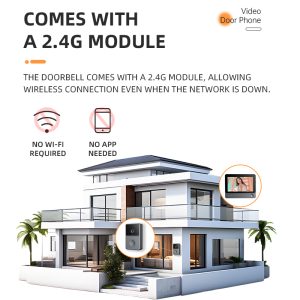 http://Looking for a reliable non-WiFi video doorbell? Check out the UOBX Video Doorbell at Xingliaoshop.com — no WiFi, no subscription, no hassle.
🔗 Looking for a reliable non-WiFi video doorbell? Chec寻找一款可靠的非WiFi视频门铃k out the UOBX Video Doorbell at Xingliaoshop.com — no WiFi, no subscription, no hassle.http://Looking for a reliable non-WiFi video doorbell? Check out the UOBX Video Doorbell at Xingliaoshop.com — no WiFi, no subscription, no hassle.
Hello world!
Welcome to WordPress. This is your first post. Edit or delete it, then start writing!