Posted on Leave a comment

Xiaomi Smart Aromatherapy Diffuser

In today’s fast-paced world, finding moments of calm and relaxation at home has become more important than ever. Whether you’re winding down after a long workday, creating a soothing nursery environment, or simply want to elevate your daily routines, the <strong>Xiaomi Smart Aroma Diffuser</strong> offers a premium, tech-forward solution that combines intelligent control with elegant design.

This compact, beautifully designed device brings spa-quality aromatherapy into your home — and thanks to its seamless Mijia APP integration, smart scheduling, and whisper-quiet operation, it’s quickly becoming a favorite among modern home wellness enthusiasts.

<h2>Why the Xiaomi Smart Aroma Diffuser Stands Out</h2>
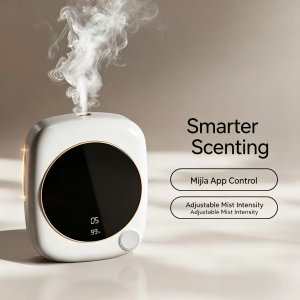
Xiaomi aroma diffuser with smart scenting APP control for home aromatherapy
Xiaomi smart aroma diffuser with intelligent scenting system — control mist, schedule timers, and customize scents via the Mi Home APP, adaptable to any home environment.

<img src=”https://PLACEHOLDER_IMAGE_1_URL” alt=”Xiaomi Smart Aroma Diffuser with mist output and LED display” />

The first thing you’ll notice about the Xiaomi Smart Aroma Diffuser is its <strong>minimalist square design</strong>. The white housing with rose-gold accent ring fits seamlessly into any modern interior, while the soft-touch circular LED display keeps you informed of timer settings, humidity levels, and battery status at a glance.

But don’t let the small footprint fool you — this little powerhouse delivers impressive mist output through a single optimized nozzle, covering rooms up to 20 square meters with ultra-fine aromatic particles.

<h3>1. Smarter Scenting with Mijia APP Control</h3>
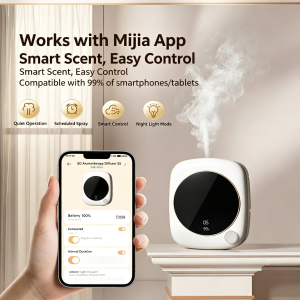
Xiaomi aroma diffuser working with Mijia app for smart scent control
Xiaomi smart aroma diffuser works seamlessly with the Mijia APP — control smart scenting and customize settings easily from your smartphone anywhere.

<img src=”https://PLACEHOLDER_IMAGE_2_URL” alt=”Xiaomi aroma diffuser APP control interface on smartphone” />

Unlike traditional diffusers that require manual button-pressing, the Xiaomi Smart Aroma Diffuser connects seamlessly to the <strong>Mijia / Xiaomi Home APP</strong> via WiFi. This unlocks a range of smart features:

<ul>
<li><strong>Remote on/off control</strong> — turn the diffuser on before you arrive home</li>
<li><strong>Adjustable mist intensity</strong> — customize the fragrance strength to your preference</li>
<li><strong>8-hour programmable timer</strong> — schedule automatic on/off cycles for daily routines</li>
<li><strong>Real-time monitoring</strong> — check water level and battery status from your phone</li>
<li><strong>Smart home integration</strong> — sync with other Xiaomi smart devices for automated routines</li>
</ul>

<h3>2. Smart Step-less Dimming & Sleepable Ambient Light</h3>
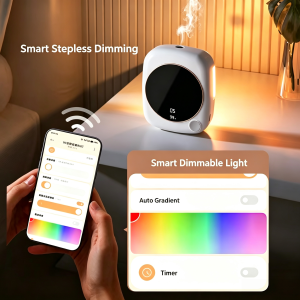
Xiaomi aroma diffuser APP controlling sleep mode and ambient light via smartphone
Xiaomi smart aroma diffuser with Mi Home APP — control sleep mode and ambient light color directly from your smartphone for personalized relaxation.

<img src=”https://PLACEHOLDER_IMAGE_3_URL” alt=”Xiaomi aroma diffuser smart dimmable light and sleep mode” />

One of the standout features is the <strong>smart dimmable ambient light</strong>. Using the Mijia APP, you can:

<ul>
<li>Choose from <strong>7+ color options</strong> to match any mood or room aesthetic</li>
<li>Activate <strong>Auto Gradient mode</strong> for smooth color transitions</li>
<li>Enable <strong>Sleep Mode</strong> with custom timer settings for restful aromatherapy</li>
<li>Adjust brightness step-lessly from soft glow to bright accent</li>
</ul>

Whether you want warm yellow for a cozy bedroom, calming blue for a nursery, or vibrant colors for a yoga session, the ambient light adapts to your needs.

<h3>3. Purifies & Deodorizes — Fills Your Home with Freshness</h3>
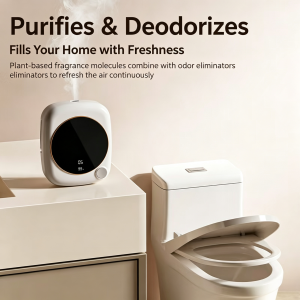
Xiaomi aroma diffuser purifies and deodorizes with Mi Home APP control and baby-safe mode
Xiaomi smart aroma diffuser purifies and deodorizes your home — Mi Home APP control, smart timing, RGB ambient light, baby-safe mode, whisper-quiet operation, and easy cleaning.

<img src=”https://PLACEHOLDER_IMAGE_4_URL” alt=”Xiaomi aroma diffuser purifies and deodorizes home air” />

The Xiaomi Smart Aroma Diffuser does more than just release pleasant scents — it actively <strong>purifies and deodorizes</strong> the air. The plant-based fragrance molecules combine with odor eliminators to refresh the air continuously, removing unwanted smells while filling your home with your favorite essential oil blends.

This dual function makes it perfect for:

<ul>
<li>Kitchens (eliminating cooking odors)</li>
<li>Bedrooms (neutralizing stale air)</li>
<li>Bathrooms (combating humidity smells)</li>
<li>Living rooms (creating a welcoming atmosphere for guests)</li>
</ul>

<h3>4. Works with Mijia App — Universal Compatibility</h3>
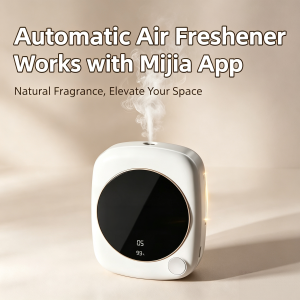

<img src=”https://PLACEHOLDER_IMAGE_5_URL” alt=”Xiaomi aroma diffuser compatible with Mijia APP and smartphones” />

One of the biggest advantages of the Xiaomi ecosystem is <strong>universal compatibility</strong>. The diffuser works seamlessly with 99% of smartphones and tablets, including both iOS and Android devices. No special adapter required — just download the Mijia APP, pair your device, and you’re ready to go.

Four core features accessible from the APP include:

<ul>
<li><strong>Quiet Operation</strong> — under 30dB whisper-quiet performance</li>
<li><strong>Scheduled Spray</strong> — automatic timer-based misting cycles</li>
<li><strong>Smart Control</strong> — full remote management from anywhere</li>
<li><strong>Night Light Mode</strong> — soft glow for bedroom use</li>
</ul>

<h3>5. Low Decibel Operation — Quiet Companion for Sleep</h3>
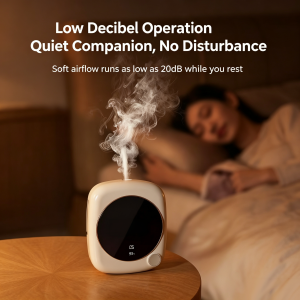
Xiaomi aroma diffuser with low decibel quiet operation beside sleeping baby
Xiaomi smart aroma diffuser operates at whisper-quiet low decibels — the perfect quiet companion for baby’s nursery, ensuring undisturbed sleep.

<img src=”https://PLACEHOLDER_IMAGE_6_URL” alt=”Xiaomi aroma diffuser low decibel quiet operation for baby’s sleep” />

For light sleepers, babies, or anyone who values peace and quiet, the Xiaomi Smart Aroma Diffuser delivers <strong>soft airflow running as low as 20dB</strong> — quieter than a soft whisper. You can run it through the night without disturbing your sleep, your baby’s rest, or your partner’s relaxation.

The cool-mist ultrasonic technology also makes it safer than traditional steam diffusers, especially in nurseries and kids’ rooms.

<h3>6. Large Display, New Upgrade — Clear Status at a Glance</h3>
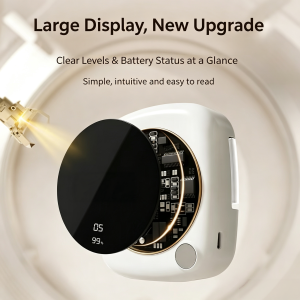
Xiaomi aroma diffuser with large clear display showing battery and mist levels
Xiaomi smart aroma diffuser features an upgraded large display — monitor mist levels and battery status at a glance, with simple operation and easy-to-read interface.

<img src=”https://PLACEHOLDER_IMAGE_7_URL” alt=”Xiaomi aroma diffuser large display showing battery and mist levels” />

The <strong>upgraded large circular display</strong> is one of the most noticeable design improvements. From across the room, you can clearly see:

<ul>
<li>Current mist intensity level</li>
<li>Battery percentage remaining</li>
<li>Active timer countdown</li>
<li>Humidity reading</li>
<li>Connection status</li>
</ul>

The simple, intuitive interface means you don’t need to check the APP for basic status updates — everything is visible at a glance on the device itself.

<h3>7. 7 Fragrance Levels — Custom Scenting for Every Moment</h3>
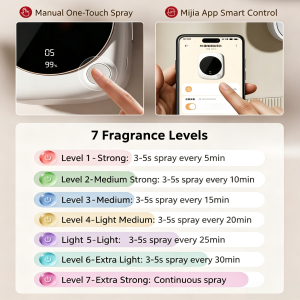
Xiaomi aroma diffuser with 7 fragrance levels from strong to extra-strong continuous spray
Xiaomi smart aroma diffuser offers 7 adjustable fragrance levels — from Level 1 strong burst to Level 7 extra-strong continuous spray, all controlled via Mijia APP or manual button.

<img src=”https://PLACEHOLDER_IMAGE_8_URL” alt=”Xiaomi aroma diffuser 7 fragrance levels from strong to extra strong” />

Whether you want a subtle background fragrance or a powerful continuous aromatherapy session, the Xiaomi Smart Aroma Diffuser offers <strong>7 adjustable fragrance levels</strong>:

<ul>
<li><strong>Level 1 (Strong):</strong> 3-5s spray every 5 minutes</li>
<li><strong>Level 2 (Medium Strong):</strong> 3-5s spray every 10 minutes</li>
<li><strong>Level 3 (Medium):</strong> 3-5s spray every 15 minutes</li>
<li><strong>Level 4 (Light Medium):</strong> 3-5s spray every 20 minutes</li>
<li><strong>Level 5 (Light):</strong> 3-5s spray every 25 minutes</li>
<li><strong>Level 6 (Extra Light):</strong> 3-5s spray every 30 minutes</li>
<li><strong>Level 7 (Extra Strong):</strong> Continuous spray</li>
</ul>

You can control this manually with the one-touch button on the device, or remotely through the Mijia APP — perfect for adjusting fragrance intensity based on room size, time of day, or personal preference.

<h2>Key Specifications</h2>

<table><tbody>
<tr><td><strong>Material</strong></td><td>ABS Plastic (BPA-Free)</td></tr>
<tr><td><strong>Battery</strong></td><td>1200-2000mAh Rechargeable</td></tr>
<tr><td><strong>Runtime</strong></td><td>Up to 12+ Hours</td></tr>
<tr><td><strong>Charging</strong></td><td>USB-C, 5V/2A</td></tr>
<tr><td><strong>Timer</strong></td><td>8-Hour Programmable</td></tr>
<tr><td><strong>Mist Output</strong></td><td>Single Nozzle, 30-50ml/h</td></tr>
<tr><td><strong>Coverage</strong></td><td>Up to 20㎡</td></tr>

Posted on Leave a comment

U9 Solar Video Doorbell — Wireless Security | Xingliao

U9 Solar Video Doorbell camera unit and Dingtone P1 indoor chime receiver

U9 Solar Smart Video Doorbell — Wire-Free Front Door Security, Powered by the Sun


正文

Tired of charging your video doorbell every few weeks? Meet the U9 Solar Smart Video Doorbell — a wire-free, solar-powered security solution that keeps your front door protected 24/7 without ever touching a power cable.

🔋 Solar-Powered, Hassle-Free

The built-in solar panel continuously charges the dual 18650 batteries (3600mAh total), so you never worry about dead batteries again. Rain or shine, it keeps running.

📹 See Who's There, Anytime, Anywhere

  • 720P HD video with 1-megapixel clarity
  • Solar Charging Smart Doorbell with 1080P Camera and Night Vision
    Solar Charging Smart Doorbell
  • 90° wide viewing angle — no blind spots
  • U9 Solar Video Doorbell retail box highlighting key features and package contents layout
    Front and side view of the U9 Solar Video Doorbell packaging box displaying product images and specifications
  • Real-time two-way talk with echo cancellation
  • U9 Smart Doorbell — PIR Motion Detection & Instant Mobile Alert

  • PIR motion detection — instant alerts when someone approaches
  • U9 Solar Video Doorbell Installation Guide Instructions
    Easy installation guide for U9 Solar Video Doorbell
  • Night vision with 850nm infrared, effective up to 2 meters
  • U9 Solar Video Doorbell camera unit and Dingtone P1 indoor chime receiver
    XINGLIAO Solar Doorbell Outdoor Camera with Indoor Chime

🔔 Smart Indoor Chime Included

The Dingtone P1 wireless chime plugs into any USB port and rings instantly when someone presses the doorbell. No wiring, no installation headaches.

🌧️ All-Weather Protection

Optional transparent or brown rainproof cover made from high-toughness PC flame-retardant material. Waterproof, impact-resistant, and UV-protected — your doorbell stays safe in any storm.

📱 Full App Control

Answer the door from your phone, check live video, review visitor records, and share device access with family — all through one intuitive app. Supports iOS 11.4+ and Android 5+.

⚡ Quick Specs

  • Resolution: VGA 720×1280, 1MP
  • U9 Smart Doorbell — PIR Motion Detection & Instant Mobile Alert

  • Viewing Angle: 90°
  • Transparent Rainproof Cover for U9 Doorbell

  • Night Vision: Auto-switch IR, 2m range
  • Power: Solar + dual 18650 batteries (3600mAh)
  • Connectivity: 2.4G Wi-Fi
  • Doorbell Size: 136×72×35mm
  • Chime Size: 55×42×25mm
  • Working Temp: -20°C to 45°C

🛒 Available Now at Xingliao Shop

5 Bundle Options:

Bundle Price
U9 Doorbell Only $29.99
Transparent Rain Cover $34.99
Brown Rain Cover $34.99
U9 + Transparent Cover Combo $59.99
U9 + Brown Cover Combo $59.99

🔗 Shop now: https://xingliaoshop.com/product/solar-video-doorbell-u9-wifi-doorbell/


标签

#SolarDoorbell #SmartHome #VideoDoorbell #WirelessSecurity #Xingliao #HomeSecurity #SolarPowered #SmartLiving


Posted on Leave a comment

Best_Tuya_Smart_Control_Screen_2026

Smart home central control screen with knob, Tuya Zigbee gateway, IPS touch display, temperature and lighting control panel
F6 Multi Functional Intelligent Central Control Screen

Best Tuya Smart Control Screen 2026: Wall-Mounted Central Panel for Modern Homes

The smart control screen has become the centerpiece of modern home automation. Instead of juggling multiple apps and switches, a single wall-mounted panel lets you control lights, curtains, temperature, music, security, and scenes from one elegant interface.

If you are building or upgrading a smart home in 2026, a Tuya smart control screen is one of the best investments you can make. In this guide, we’ll explain what to look for, compare size options, and introduce the Xingliao F6 / F8 Multi-Functional Intelligent Central Control Screen available in 6", 7", 8", 10", and 12" sizes.

What Is a Smart Control Screen?

A smart control screen, also called a smart home panel or central control screen, is a wall-mounted touchscreen that connects to your smart home ecosystem. It replaces traditional light switches and thermostats with a single interactive display.

With the right panel, you can:

  • Control lighting, air conditioning, and curtains
  • Adjust RGB lighting colors and brightness
  • Play music through built-in speakers
  • Monitor and answer video doorbells with two-way audio
  • Create one-touch scenes like "Leave Home" or "Movie Mode"
  • Manage everything through the Tuya Smart or Smart Life app

Why Choose a Tuya Smart Control Screen?

Tuya is one of the largest smart home ecosystems in the world. Choosing a Tuya-compatible control panel gives you access to thousands of devices that work together seamlessly.

Key advantages include:

    F6 smart home control panel with rotary knob, side view, dimming and scene control in modern living room
    F6 Smart Control Panel Rotary Knob Scene Control

  • WiFi, Zigbee, and RS485 support in one device
  • Voice control with built-in 4-microphone arrays
  • Scene automation for lighting, climate, and security
  • Mobile app control from anywhere
  • Hotel and real estate compatibility for commercial projects

6", 7", 8", 10", 12" — Which Size Is Right for You?

F6 smart home control panel with Tuya APP remote control on smartphone
F6 Smart Control Panel Tuya APP Remote Control

Size Best For Key Benefit
6 inch Small rooms, hallways, bedrooms Compact, affordable, fits standard 86 boxes
7 inch Apartments, home offices Balanced screen size and installation flexibility
8 inch Living rooms, master bedrooms Larger display for music, video doorbell, and scenes
10 inch Luxury homes, villas, showrooms Premium visual experience and full home overview
12 inch Commercial projects, hotels, real estate Maximum impact and multi-user control

The right size depends on your room, budget, and how many devices you want to control from one panel.

Xingliao Multi-Functional Smart Control Screen: Features Breakdown

At Xingliao Smart Home, we offer a professional-grade Tuya smart control screen designed for both residential and commercial installations.

All-in-One Smart Home Control

The Xingliao control panel integrates voice control, gateway, music playback, lighting control, curtain control, air conditioning, and video intercom into one device.

Triple Connectivity

Support for WiFi, Zigbee, and RS485 means the panel works with nearly every smart device and building management system.

Built-In Music and Voice

Synchronize with your mobile phone to stream music directly. The built-in 4-microphone array supports voice commands for hands-free control.

Stunning Display

The ultra-thin, ultra-narrow bezel design delivers a premium look. Screen resolution up to 1280 × 800 IPS LCD ensures crisp visuals and responsive touch.

Easy Installation

The dual 86 bottom box design allows direct replacement of existing double 86 switches. No need to reroute wiring or rebuild walls.

Smart Scenes for Every Space

From hotels and shopping malls to real estate projects and private homes, the Xingliao smart control screen adapts to any environment.

Technical Specifications

    Xingliao Tuya smart control screen RGB light and color adjustment - 6 inch 8 inch 10 inch
    Adjust RGB lighting colors and brightness directly from the Xingliao smart control panel. Shop smart home screens at xingliaoshop.com.

  • CPU: CORTEX-A7 quad core 1.5G
  • Display: 1280 × 800 high-definition IPS LCD
  • Network: Wireless 802.11 b/g/n, 10/100M Ethernet
  • Protocols: WiFi, Zigbee, RS485
  • Installation: Embedded, standard double 86 box
  • Audio: BASS audio output, AUX-IN, 2× (10-25W) speaker output
  • Light Control: 2-way × 2, up to 200W
  • Color: Grey
  • Overall Dimensions: 208 × 186 × 10 mm

Real-World Use Cases

Smart Living Rooms

Control RGB lighting, temperature, and music without leaving the sofa. Create a "Movie Mode" scene that dims lights, closes curtains, and starts your playlist.

Smart Bedrooms

Use the panel as a bedside control center. Adjust temperature, set wake-up scenes, and check who is at the door through the video intercom.

Hotels and Commercial Buildings

The Xingliao smart control screen integrates with hotel management systems, giving guests centralized control over room lighting, climate, and entertainment.

How to Install a Tuya Smart Control Screen

Installation is simple for electricians and DIY enthusiasts:

  1. Turn off power at the breaker.
  2. Remove the existing double 86 switch.
  3. Connect the panel according to the wiring diagram.
  4. Secure the panel into the standard 86 box.
  5. Power on and configure through the Tuya Smart app.

Because the panel uses a standard double 86 box, it fits most existing wall installations without modification.

Smart Control Screen vs Smart Switch: What’s the Difference?

A smart switch controls one or two circuits. A smart control screen controls your entire home. If you want centralized control, scene automation, music, video intercom, and app access, the control screen is the better choice.

Final Thoughts

A Tuya smart control screen is the fastest way to transform a regular home into a truly smart home. With sizes from 6 inch to 12 inch, the Xingliao multi-functional central control panel fits projects of every scale.

Ready to upgrade your smart home?

👉 Shop Xingliao Smart Control Screens at xingliaoshop.com


Xingliao Smart Home — Smart Living for Everyone. Discover premium smart home solutions including smart control screens, sensors, security cameras, and more at xingliaoshop.com.

Posted on Leave a comment

Smart Light Switch Buying Guide 2026: WiFi vs Zigbee vs Matter Protocol

Smart home light switches comparison showing WiFi, Zigbee, and Matter protocol devices on dark background with golden accents
Compare WiFi, Zigbee, and Matter smart switches for your smart home setup
Why Upgrade to Smart Light Switches?

Smart light switches are the foundation of any modern smart home. Unlike smart bulbs, they control your existing lights while adding automation, remote control, and energy monitoring capabilities.

Key Benefits:

Control lights from anywhere via smartphone
Voice control with Alexa, Google Home, Siri
Schedule automation (sunrise/sunset, away mode)
Energy usage monitoring
No need to replace existing bulbs
Works with physical wall switches
Protocol Comparison: WiFi vs Zigbee vs Matter

WiFi Smart Switches
Best for: Beginners, small apartments, budget-conscious users

Pros:

No hub required – connects directly to router
Easy setup with manufacturer apps
Wide compatibility
Lower cost
Cons:

Can congest home WiFi network
Higher power consumption
Dependent on internet connection
Limited range from router
Top Pick: Tuya WiFi Smart Switch – Reliable, affordable, works with Tuya Smart Life app

Zigbee Smart Switches
Best for: Larger homes, power users, existing Zigbee ecosystems

Pros:

UK standard 147x86mm smart wall switch with tempered glass panel and WiFi connectivity
UK standard smart wall switch – 147x86mm glass panel with WiFi and app control

Mesh network extends range automatically
Lower power consumption
Faster response times
Works offline (local control)
Doesn’t congest WiFi
Cons:

Requires Zigbee hub (SmartThings, Hubitat, Home Assistant)
Slightly higher initial cost
More complex setup
Top Pick: Aqara Smart Wall Switch – Compact design, excellent build quality, HomeKit compatible

Matter Protocol (2026’s Game Changer)
Best for: Future-proofing, multi-platform households

Pros:

Universal compatibility (Works with all major platforms)
Local control without internet
Enhanced security
Simplified setup process
Growing ecosystem support
Cons:

UK standard 147x86mm smart wall switch with tempered glass panel and WiFi connectivity
EU standard 86x86mm smart water heater switch – WiFi enabled with timer and remote control

Still maturing ecosystem
Requires Matter-compatible hub or border router
Limited product selection (growing rapidly)
Top Pick: Eve Energy Switch (Matter) – Thread-based, privacy-focused, no cloud required

Wiring Guide: Understanding Your Home

1-Way Switch (Single Pole)
What it controls: One light from one location
Wiring: Live wire in, switched live out, neutral required for smart switches
Best for: Most rooms, simple setups

2-Way Switch (Two-Way)
What it controls: One light from two locations (e.g., hallway top and bottom)
Wiring: Two switches connected via traveler wires
Smart solution: Install smart switch at main location, compatible companion switch at second location

Multi-Way Switch (3+ Locations)
What it controls: One light from three or more locations
Wiring: Multiple switches with complex traveler wiring
Smart solution: One master smart switch, multiple wireless remote switches

Important: Neutral Wire Requirement
Most smart switches require a neutral wire. Check your electrical box:

Have neutral wire (white): Most smart switches will work
No neutral wire: Look for “no neutral” smart switches (limited options, often dimmer-only)
Safety Note: Always turn off power at breaker before installation. Consult a licensed electrician if unsure.

Top 5 Smart Light Switches for 2026

Tuya WiFi Smart Touch Switch
Price: $12-25
Protocol: WiFi
Features: Touch panel, timer, scene control, voice control
Best for: Budget-friendly smart home entry
Rating: ⭐⭐⭐⭐⭐ (4.8/5)

Aqara Smart Wall Switch H1
Price: $35-50
Protocol: Zigbee 3.0
Features: No neutral option, HomeKit support, power monitoring
Best for: Apple HomeKit users, no-neutral installations
Rating: ⭐⭐⭐⭐⭐ (4.7/5)

Lutron Caséta Wireless
Price: $50-60
Protocol: Proprietary (Lutron Clear Connect)
Features: Premium build, excellent dimming, no neutral required
Best for: Premium installations, no-neutral homes
Rating: ⭐⭐⭐⭐⭐ (4.9/5)

Shelly 1L
Price: $15-20
Protocol: WiFi
Features: Small size fits in wall box, no neutral option, dry contact
Best for: Retrofit installations, tight spaces
Rating: ⭐⭐⭐⭐ (4.5/5)

Eve Light Switch (Matter)
Price: $45-55
Protocol: Thread/Matter
Features: Privacy-focused, no cloud, local control, Apple Home
Best for: Privacy-conscious users, Matter early adopters
Rating: ⭐⭐⭐⭐⭐ (4.6/5)

Installation Tips

Before You Buy:

Check your wiring: Remove existing switch and check for neutral wire (usually white)
Count the gangs: Single gang (1 switch), double gang (2 switches side by side)
Measure the box: Ensure smart switch fits (some are deeper than standard switches)
Check load rating: Ensure switch supports your light fixture’s wattage
Installation Steps:

Turn off power at circuit breaker
Remove old switch faceplate
Disconnect wires (take photo first!)
Connect smart switch wires (follow manufacturer diagram)
Secure switch in box, attach faceplate
Turn power back on
Configure in app
Common Issues:

Switch doesn’t fit: Look for slim models or use a deeper box
Flickering lights: Check wattage compatibility, may need bypass capacitor
No neutral wire: Use no-neutral compatible switches or install neutral wire
2-way setup not working: Ensure companion switch is compatible
Smart Switch Features to Consider

Must-Have Features:

Voice control: Alexa, Google Assistant, Siri compatibility
Scheduling: Set timers and routines
Remote control: App control from anywhere
Physical button: Maintain wall switch functionality
Nice-to-Have Features:

Dimming: Adjust brightness (requires dimmable bulbs)
Energy monitoring: Track power usage
Scene control: Multiple switches work together
LED indicator: Find switch in dark
No neutral option: For older homes without neutral wires
Advanced Features:

Matter support: Future-proof protocol
Thread networking: Reliable, low-power mesh
Local control: Works without internet
Home Assistant integration: Open-source smart home platform
Creating Smart Lighting Scenes

Morning Routine:

7:00 AM: Gradually turn on bedroom lights (simulating sunrise)
7:30 AM: Turn on kitchen and hallway lights
8:00 AM: Turn off all lights when leaving for work
Evening Routine:

6:00 PM: Turn on living room lights at 70% brightness
8:00 PM: Dim lights to 40% for movie time
10:00 PM: Turn off all lights except bedroom
Away Mode (Security):

Randomly turn lights on/off between 7 PM – 11 PM
Simulate occupancy when traveling
Frequently Asked Questions

Q: Do smart switches work without internet?
A: WiFi switches need internet for remote control but work locally. Zigbee and Matter switches work completely offline.

Q: Can I install a smart switch myself?
A: If you’re comfortable with basic electrical work and have a neutral wire, yes. Otherwise, hire an electrician.

Q: Will smart switches work with LED bulbs?
A: Most do, but check compatibility. Some dimming switches need a minimum load (bypass capacitor may be needed).

Q: Can I use smart switches in a 2-way setup?
A: Yes, but you need compatible companion switches or wireless remotes.

Q: What’s the difference between smart switches and smart bulbs?
A: Smart switches control the power to any bulb. Smart bulbs replace existing bulbs and offer color control. Smart switches are better for permanent installations.

Conclusion

Smart light switches are the smartest entry point into home automation. They offer:

Convenience: Control from anywhere
Energy savings: Automated scheduling
Security: Simulate occupancy
Comfort: Perfect lighting for every moment
Our Recommendation:

Budget choice: Tuya WiFi Switch ($12-25)
Best overall: Aqara Smart Switch H1 ($35-50)
Premium option: Lutron Caséta ($50-60)
Future-proof: Eve Matter Switch ($45-55)
Start with one room and expand gradually. Your smart home journey begins with a single switch!

Ready to upgrade? Browse our Smart Switch Collection and use code SMARTHOME10 for 10% off your first order!

Last Updated: July 2026 | Xingliao Smart Home – Premium Smart Home Solutions

Disclaimer: Always consult a licensed e
…(truncated)…

Posted on Leave a comment

tuya_rain_sensor_guide_2026_wp.html

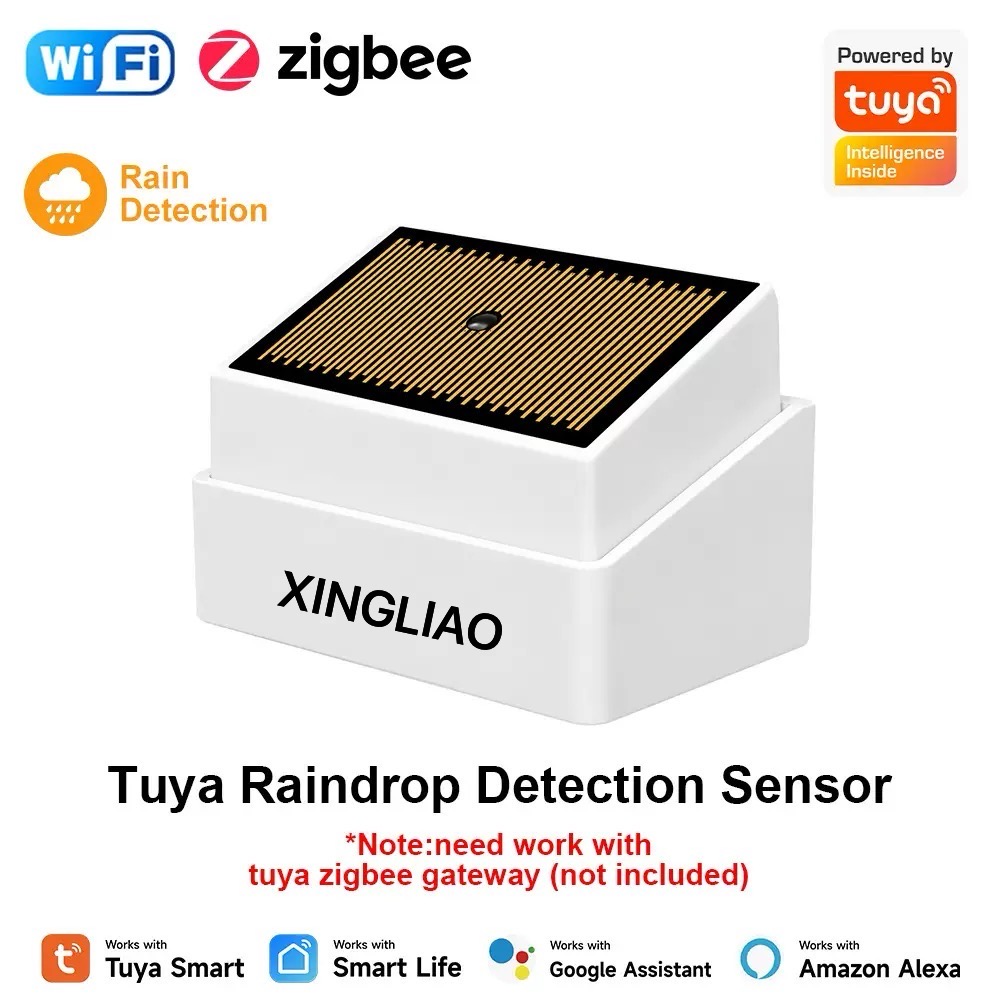
Smart rain sensor with WiFi connectivity for home automation

## What Is a Smart Rain Sensor and Why You Need One

Smart rain sensor with WiFi connectivity for home automation
WiFi-enabled rain sensor for automatic sprinkler control and smart home integration

A smart rain sensor automatically detects rainfall and triggers actions like closing windows, shutting off sprinklers,
or sending alerts to your phone. Unlike traditional rain sensors,
smart versions connect to your home WiFi and integrate with apps like Tuya Smart, Smart Life, or Alexa.

**Key benefits:**
– Save water by stopping irrigation during rain
– Protect indoor spaces from water damage
– Get instant notifications when rain starts
– Automate window closers and awnings

## Types of Rain Sensors Compared

| Type | How It Works | Best For |
|——|————–|———-|
| Optical | Detects water droplets on lens surface | Smart home integration |
| Conductive | Measures electrical resistance between contacts | Budget setups |
| Tipping bucket | Measures rainfall volume | Garden/irrigation systems |
| Hygroscopic | Expands when wet to trigger switch | Simple on/off automation |

## Top Features to Look For

**WiFi Connectivity**
Choose sensors with 2.4GHz WiFi support for reliable connection to your smart home hub.

**App Compatibility**
Tuya/Smart Life compatible sensors offer the widest device ecosystem and automation options.

**Response Speed**
Look for sensors that trigger within 30 seconds of rainfall detection.

**Battery Life**
Outdoor sensors should last 6+ months on battery or have solar charging.

**IP Rating**
IP65 or higher ensures the sensor survives heavy rain and dust.

## Installation Tips

1. **Mount at an angle** – 30-45 degrees helps water run off and prevents false triggers from dew
2. **Avoid direct sunlight** – UV can degrade plastic housings over time
3. **Test placement** – Spray with a hose to verify detection zone before final mounting
4. **Set up automations** – Link to smart sprinklers, window motors, or notification routines

## Recommended Smart Rain Sensors 2026

**Budget Pick:** Tuya WiFi Rain Sensor (~$15)
– Simple drop detection
– Tuya Smart app integration
– 2-year battery life

**Best Overall:** Zemismart Rain Sensor with Temperature (~$28)
– Rain + temperature monitoring
– Works with Alexa/Google Home
– Solar panel option available

**Premium Choice:** Netatmo Rain Gauge (~$99)
– Precise rainfall measurement (0.1mm accuracy)
– 5-minute update intervals
– Weather station integration

## FAQ

**Q: Can I use a rain sensor without WiFi?**
A: Yes, basic models work as standalone switches, but you’ll miss smartphone alerts and automation features.

Xingliao Smart Home factory building in Shenzhen China
Xingliao Smart Home manufacturing facility in Shenzhen, China
Xingliao Smart Home team at international trade show with business partners
Xingliao Smart Home team meeting with international partners at global trade exhibition

**Q: Will light dew trigger the sensor?**
A: Quality sensors have adjustable sensitivity to distinguish between dew and actual rain.

**Q: How do I connect to my sprinkler system?**
A: Most smart sensors output a dry contact signal that can wire directly to irrigation controllers.

**Ready to upgrade your home?** Browse our collection of smart rain sensors and weather monitoring devices at XingLiao Shop.

Posted on Leave a comment

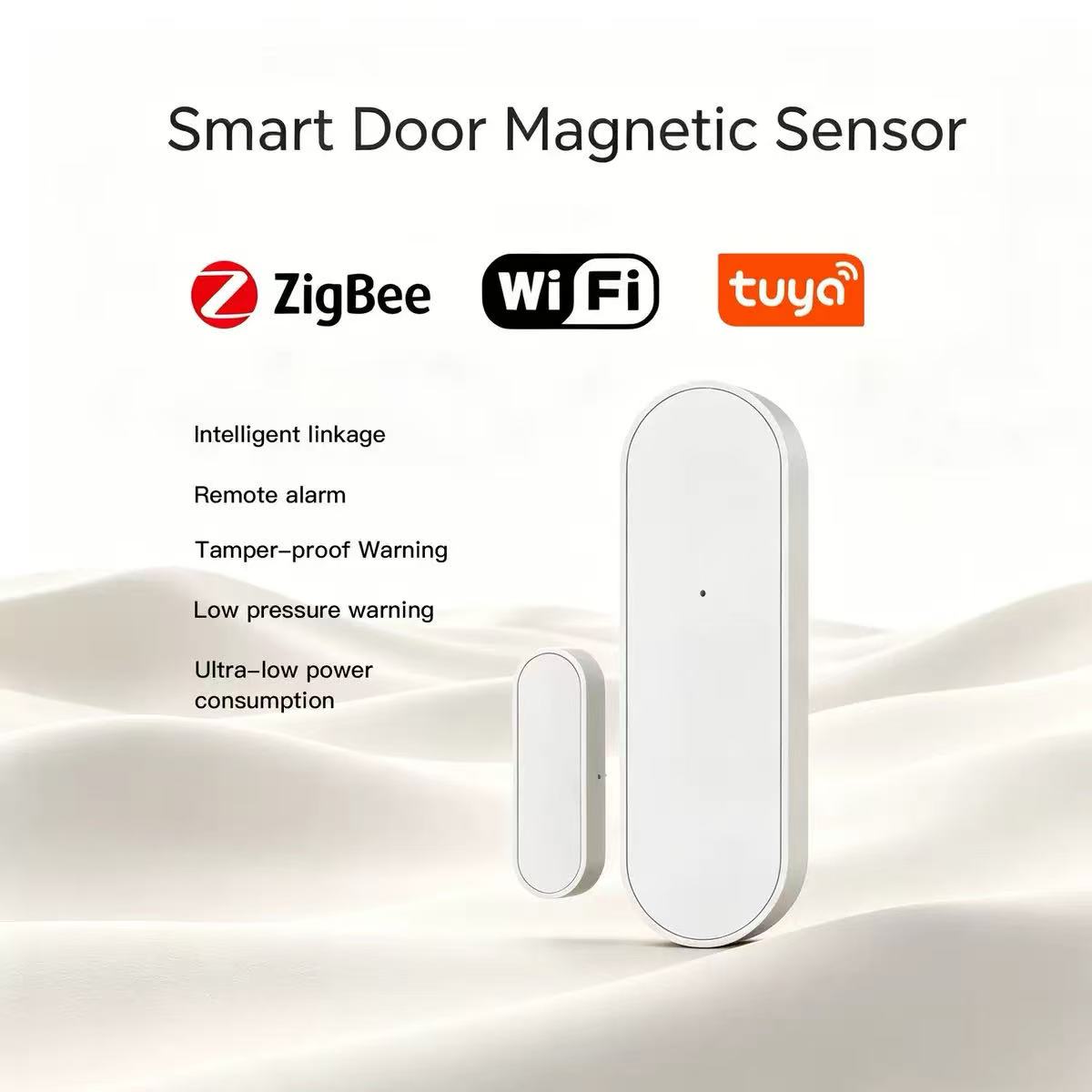
Smart Door Sensor : How to Choose the Best WiFi Door & Window Sensor

Tuya Zigbee smart door magnetic sensor for home security system
Tuya smart door magnetic sensor featuring Zigbee and WiFi connectivity. Wireless door/window sensor for smart home security systems. Compatible with Tuya Smart Life app and major smart home platforms.

How to Choose a Smart Door Sensor in 2026: The Tiny Device That Secures Everything

One opening. One alert. One line of defense you never knew you needed.


Wait — Is Your Home Actually Protected When You're Away?

Let's start with a simple test.

You're at work. Your kids are at school. Your front door is locked, windows closed, garage secured. You check your security camera app — everything looks fine. But here's the question:

How would you know if someone opened a window on the second floor?

Your camera covers the driveway. Your doorbell watches the porch. But what about the back window? The basement entry? The sliding door to the patio?

In 2026, 60% of break-ins happen through unsecured entry points — not the front door, but the window you left cracked for air, the side door you forgot to check, the garage door that didn't quite close.

A security camera sees what happens. A door sensor tells you something is happening — instantly.

So before you buy another camera that watches your driveway, let's talk about the unsung hero of home security: the smart door and window sensor.


The 2026 Smart Sensor Checklist: What Really Matters

1. Response Speed: Every Second Counts

When a door opens unexpectedly, you have a 3-second window to respond before an intruder is inside. Not 30 seconds. Not a minute. Three seconds.

2026 response time standards:

  • Excellent: < 1 second from trigger to alert
  • Good: 1-2 seconds
  • Acceptable: 2-3 seconds
  • Unacceptable: > 3 seconds

Why speed matters:

  • Faster alert = faster reaction
  • Instant sirens deter intruders immediately
  • Real-time notifications let you call authorities while the event is happening, not after

The technology behind speed:

  • WiFi 6 direct connection — no hub delay
  • Local processing — alert generated on-device, not in the cloud
  • Push notification priority — bypasses Do Not Disturb for security alerts

2. Connectivity: WiFi vs. Zigbee vs. Z-Wave

In 2026, sensors connect three ways. Each has trade-offs:

Protocol Pros Cons Best For
WiFi No hub needed, direct to router, long range Higher power use, network congestion Standalone installations, renters
Zigbee 3.0 Low power, mesh network, reliable Requires hub/gateway Integrated smart homes
Z-Wave Dedicated frequency, less interference Requires hub, declining ecosystem Legacy installations
Matter/Thread Universal standard, local-first Still rolling out in 2026 Future-proof builds

Our recommendation for 2026: WiFi 6 sensors for simplicity, Zigbee 3.0 for integrated systems. Matter-compatible if you're building for 2027+.

3. Battery Life: Set It and Forget It

Nothing kills security faster than a dead sensor you forgot to check.

2026 battery life benchmarks:

  • Poor: 3-6 months (constant replacement hassle)
  • Average: 6-12 months (acceptable but annoying)
  • Good: 1-2 years (set and forget)
  • Excellent: 2+ years or USB-C rechargeable

What drains battery fast:

  • Frequent false alarms (vibration sensitivity too high)
  • Weak WiFi signal (sensor works harder to maintain connection)
  • Cold temperatures (lithium batteries lose capacity below 0°C)
  • Excessive polling (hub constantly asking for status)

Pro tip: Look for sensors with battery level alerts — notification when power drops below 20%, not sudden death.

4. Detection Accuracy: No More False Alarms

The #1 reason people disable security sensors? False alarms.

Common false alarm triggers:

  • Wind rattling windows
  • Heavy trucks passing by
  • Temperature expansion/contraction
  • Pets bumping doors
  • Vibrations from appliances

2026 accuracy features:

  • Adjustable sensitivity — dial in the perfect threshold
  • Vibration filtering — distinguishes between door opening and door shaking
  • Tamper detection — knows if someone tries to remove or block the sensor
  • Temperature compensation — maintains accuracy from -10°C to 60°C

The 5-second rule: A quality sensor should distinguish between "door opened" and "door vibrated" within 5 seconds of analysis.

5. Integration: Does It Play Well With Others?

A sensor that only beeps is a doorbell, not a security device.

2026 integration must-haves:

  • Smart home platforms: Alexa, Google Home, Apple HomeKit, SmartThings
  • Security systems: Trigger cameras, sirens, lights automatically
  • Automation engines: If door opens, then turn on lights + start recording + send alert
  • IFTTT/Zapier: Connect to non-smart devices and services

Real-world automation examples:

  • Front door opens at 11 PM → All lights turn on + Camera starts recording + Alert sent
  • Window opens while away → AC turns off + Push notification + Siren arms after 30 seconds
  • Garage door opens unexpectedly → Interior cameras activate + Phone call initiated

6. Installation: Magnetic vs. Mechanical

Magnetic sensors (most common):

  • Two pieces: sensor body + magnet
  • Install on door/window frame and moving part
  • Gap tolerance: 2-3cm typical
  • Pros: Easy install, no moving parts, reliable
  • Cons: Visible, can be bypassed if gap is too large

Mechanical sensors (advanced):

  • Single unit with internal accelerometer
  • Detects vibration, tilt, or position change
  • Pros: Hidden installation, harder to bypass
  • Cons: More expensive, complex calibration

2026 recommendation: Magnetic for 90% of installations. Mechanical for high-security scenarios.

7. Form Factor: Invisible Security

The best security is security you don't see.

2026 design trends:

  • Ultra-thin: < 10mm thickness, blends with door frame
  • Neutral colors: White, black, silver — matches any decor
  • Flexible mounting: Adhesive, screws, or magnetic attachment
  • Indoor/outdoor rated: IP54 minimum for exterior doors/windows

Size matters: A sensor the size of a pack of gum is better than one the size of a smartphone. Smaller = more placement options = better security coverage.

8. Notification Options: More Than Just a Beep

When something happens, how do you want to know?

2026 notification methods:

  • Push notification — phone buzz, instant awareness
  • SMS text — works even without internet
  • Phone call — automated call with voice alert
  • Email — detailed log with timestamps
  • Smart speaker — "Front door opened" announced throughout house
  • Strobe light — visual alert for hearing-impaired
  • Siren — 110dB deterrent, programmable delay

The best sensors offer tiered alerts:

  • Immediate: Push notification
  • 30 seconds: SMS if not acknowledged
  • 60 seconds: Phone call if still not acknowledged
  • 120 seconds: Siren activates, authorities notified

The Hidden Costs of Cheap Sensors

That $9 sensor on Amazon looks tempting. Here's the real cost:

Cost Factor Cheap Sensor Quality Sensor
Purchase price $9 $25-40
Battery replacements (3 years) $15 (6 changes) $0 (2+ year life)
False alarm stress High Low
Failed detection risk Real Minimal
App subscription $3/month $0
3-year total $132 $25-40

The $9 sensor isn't cheaper. It's just more expensive in frustration.


So, What's the Answer? One Sensor. One Network. Total Awareness.

After installing sensors in hundreds of homes, the pattern is clear: security isn't about cameras watching — it's about knowing instantly when something changes.

A camera records the break-in. A sensor prevents it.

This is where the Tuya WiFi smart door sensor approach stands out in 2026. It's not just a magnetic switch with a WiFi chip — it's a complete entry-point awareness system.

The technical foundation:

  • WiFi 6 direct connection — no hub, no bridge, no delay. Connects straight to your router
  • < 1 second alert speed — from door opening to phone notification
  • 2+ year battery life — set it and genuinely forget it
  • Adjustable sensitivity — dial in the perfect balance of detection vs. false alarms
  • Tuya Smart Life app — one app for sensors, cameras, lights, locks, everything
  • Voice assistant ready — "Alexa, is the back door closed?"

But the real power? The ecosystem.

This sensor doesn't work alone — it works with:

  • Smart cameras — door opens, camera starts recording instantly
  • Smart lights — entry detected, pathway illuminates automatically
  • Smart plugs — trigger any device: siren, radio, TV
  • Smart displays — show door status on kitchen or bedroom screens
  • Other sensors — create zones: "If any ground-floor sensor triggers, activate all defenses"

Real-world scenario:

It's 2 AM. You're asleep. A window in the guest bedroom opens.

Without sensors: Nothing. Maybe the camera catches something. Maybe not. You'll find out in the morning.

With Tuya sensors:

  • 0.5 seconds: Sensor detects opening
  • 1 second: Push notification hits your phone
  • 2 seconds: Bedroom smart display shows "Guest bedroom window OPEN"
  • 3 seconds: Hallway lights turn on at 10% brightness
  • 5 seconds: Camera in guest bedroom starts recording
  • 10 seconds: If not acknowledged, siren begins soft warning beep
  • 30 seconds: If still not acknowledged, full 110dB alarm activates

You wake up informed, not surprised.


Final Verdict: What Should You Buy in 2026?

If you live in an apartment:
Start with front door + main window. Two sensors cover 80% of entry points. Add balcony door if applicable.

If you have a house:
Minimum six sensors: front door, back door, garage door, and three ground-floor windows. Add basement entry if you have one.

If you have a business:
Every entry point + stock room + cash handling area. Integrate with existing alarm system. Consider mechanical sensors for high-value areas.

If you want maximum security:
Sensors on every door and window, plus glass-break detectors, motion sensors, and cameras. Create layered zones with escalating responses.

If you want simplicity:
WiFi sensors, no hub, Tuya Smart Life app. Install in 5 minutes per sensor. Works with everything.


The Bottom Line

Choosing a smart door sensor in 2026 isn't about finding the cheapest device or the most features. It's about reliable awareness — knowing, instantly and accurately, when something in your home changes.

Ask the hard questions:

  • Will this alert me before an intruder is inside?
  • Will it work when my internet is slow?
  • Will I remember to change the battery?
  • Will it integrate with the devices I already own?
  • Will my family actually use it?

Get those answers right, and that tiny sensor becomes the silent guardian of everything you care about.

One opening. One alert. One decision that keeps everything safe.


What's your current home security setup? Do you rely on cameras alone, or have you added sensors? Share your experience in the comments — I'd love to hear what's working (and what isn't) in your home.


Ready to secure every entry point? Explore the full range of Tuya WiFi smart door and window sensors and find your perfect fit.

Contact Xingliao (星廖) today:

From single door sensors to complete home security systems — all built on the Tuya ecosystem with One Screen One System integration.


About the author: Smart home security consultant with 8+ years of experience designing entry-point protection systems for residential and commercial properties. Currently maintaining a 24-sensor network across two locations — zero false alarms in 18 months.