Posted on Leave a comment

Best_Smart_Rain_Sensor_2026

Best Smart Rain Sensor 2026: A Complete Buyer's Guide

As smart home ecosystems become more connected, homeowners are looking beyond cameras and doorbells for devices that protect their property from the elements. One of the most underrated additions to any connected home is a smart rain sensor.

Whether you want to protect an open skylight, automate garden irrigation, or simply receive an alert before a storm soaks your balcony, a WiFi or Zigbee rain sensor can save you money and stress. In this guide, we’ll explain what a smart rain sensor does, what features to look for, and why the Xingliao Tuya Smart Rain Sensor stands out as one of the best options available today.

What Is a Smart Rain Sensor?

A smart rain sensor is a compact device that detects rainfall or standing water and sends real-time notifications to your smartphone. Most models connect through 2.4GHz WiFi or Zigbee 3.0 and integrate with apps like Tuya Smart or Smart Life, allowing you to create automated scenes with other smart devices.

For example, when rain is detected, your sensor can trigger:

  • Window or skylight motors to close automatically
  • Smart curtains to retract
  • Outdoor awnings to fold in
  • Garden irrigation systems to pause
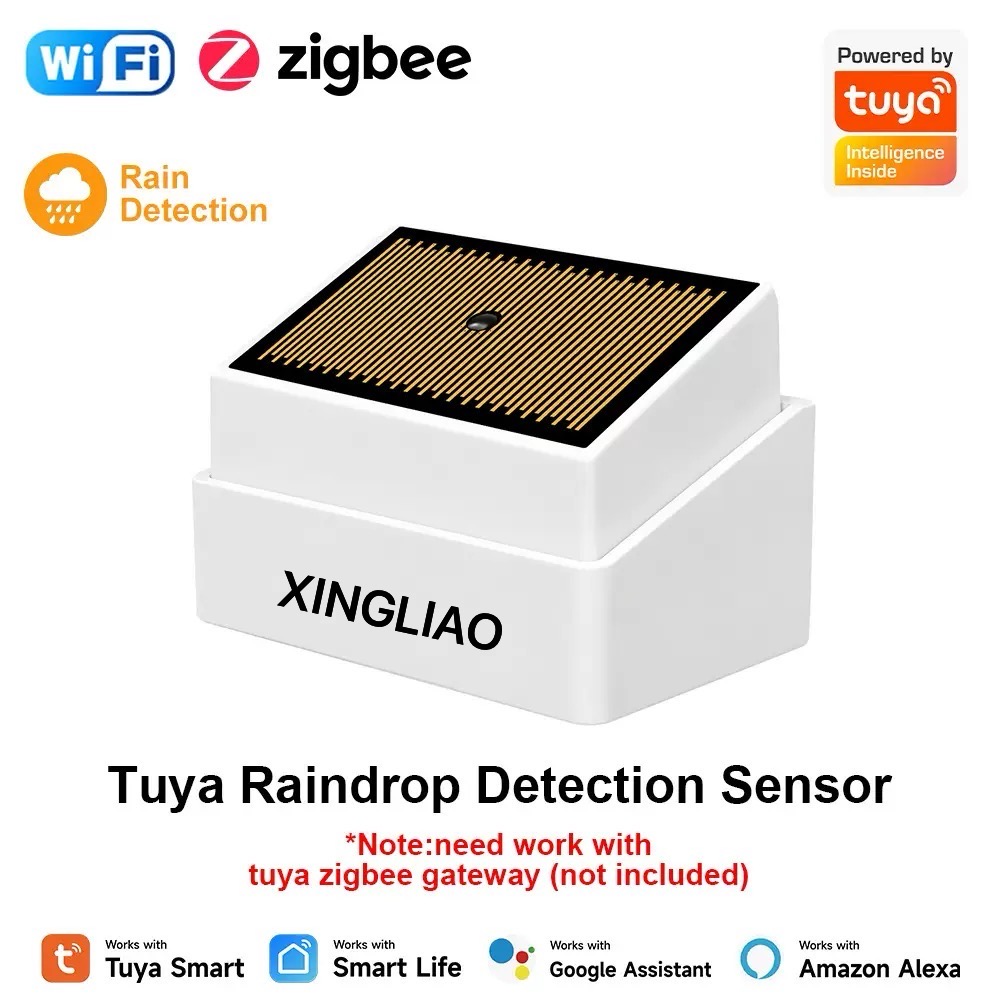
Tuya Smart Rain Sensor WiFi Zigbee - Xingliao Smart Home
Tuya Smart Rain Sensor – WiFi & Zigbee

This kind of home automation turns passive weather monitoring into active protection.

Why You Need a Smart Rain Sensor in 2026

Weather patterns are becoming less predictable. Even a short rainstorm can damage indoor furniture, electronics, or flooring if a window is left open. A WiFi rain detector gives you instant alerts no matter where you are, so you can react in seconds rather than hours.

Here are the top reasons homeowners are adding smart rain sensors to their setups:

  1. Real-time alerts — Know the moment rain starts.
  2. Automatic scene linkage — Connect with curtains, windows, sprinklers, and more.
  3. Energy efficiency — Pause irrigation when nature does the watering.
  4. Flood detection — Many models also detect standing water and leaks.
  5. Affordable protection — A small investment compared to water damage repair costs.

What to Look for in a Smart Rain Sensor

When comparing models, focus on these key features:

Connectivity

WiFi rain sensors connect directly to your router and are easy to set up. Zigbee rain sensors require a hub or gateway but offer more stable mesh networking and longer battery life. If you already use a Tuya Zigbee hub, the Zigbee version is often the better long-term choice.

App Compatibility

Look for sensors that work with Tuya Smart or Smart Life. These apps support thousands of devices and offer powerful automation rules, also known as scenes.

Battery Life

Battery-powered sensors are easier to install outdoors. WiFi models typically last around one year, while Zigbee models can last up to three years on two AAA batteries.

Detection Sensitivity

A good sensor should detect light rain quickly without false alarms from humidity. Look for models that advertise high-precision detection.

Build Quality

Outdoor installation requires a device that can handle temperature changes. A reliable operating range of -10°C to 50°C is ideal.

Xingliao Tuya Smart Rain Sensor: Best Value Pick

At Xingliao Smart Home, we designed our Tuya Smart Rain Sensor to deliver professional-grade weather awareness at a price that fits everyday budgets.

The Xingliao rain sensor offers:

  • 2-in-1 detection for both rainfall and water flooding
  • WiFi and Zigbee options to match your smart home setup
  • Smart Life / Tuya Smart app integration
  • Automatic scene linkage with windows, curtains, irrigation, and more
  • Compact design measuring just 70 × 24 × 21 mm
  • Long battery life — up to 1 year on WiFi, up to 3 years on Zigbee
  • Operating range of -10°C to 50°C for indoor or outdoor use

You can choose the version that fits your network: the WiFi model for simple setup, or the Zigbee model for stronger mesh performance and longer battery life.

Shop the Xingliao Smart Rain Sensor now at xingliaoshop.com.

How to Install and Use a Smart Rain Sensor

Installation is straightforward. Most models can be mounted on a window frame, balcony railing, or outdoor wall using the included bracket or adhesive backing.

After setup in the Tuya Smart app, create simple automations:

  • If rain detected → close smart window opener
  • If rain detected → pause irrigation timer
  • If rain detected → send push notification to phone

These automations run locally or through the cloud depending on your hub, giving you flexibility and reliability.

Smart Rain Sensor vs Traditional Rain Gauge

A traditional rain gauge only measures how much rain has fallen. A smart rain sensor tells you when rain starts, sends alerts, and triggers actions. For home automation, the smart sensor is the clear winner.

Final Thoughts: Is a Smart Rain Sensor Worth It?

If you own smart curtains, motorized windows, a sprinkler system, or an outdoor balcony, a smart rain sensor is one of the easiest ways to add real value to your smart home. It protects your property, reduces manual monitoring, and works quietly in the background.

For a reliable, affordable, and feature-rich option, the Xingliao Tuya Smart Rain Sensor is a top choice in 2026.

Ready to make your home weather-aware?

👉 Shop the Xingliao Smart Rain Sensor at xingliaoshop.com


Xingliao Smart Home — Smart Living for Everyone. Explore premium smart home devices, from intelligent security to climate-aware automation, at xingliaoshop.com.
Posted on Leave a comment

smart_home_panel_guide_2026

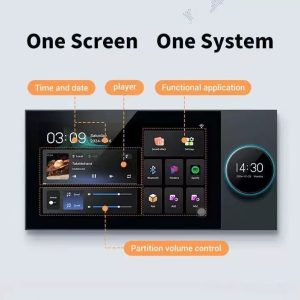
Xingliao smart home panel music player and scene control interface with room management
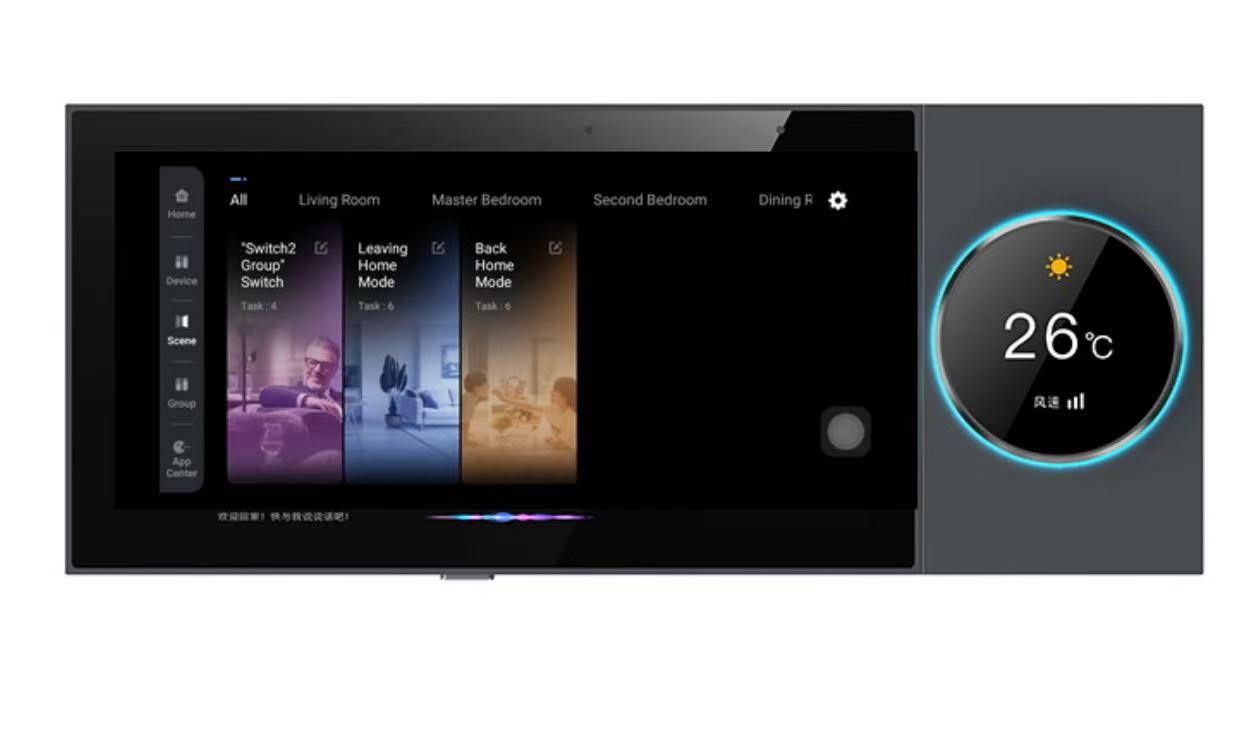
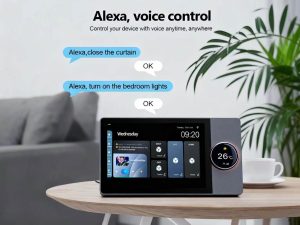
Xingliao smart home control panel with Alexa voice control - 10 inch touchscreen hub
Xingliao Smart Panel Alexa Voice Control

How to Choose a Smart Home Control Panel in 2026: A Buyer's Guide

One screen. One system. One decision that changes everything.


Wait — Do You Actually Need a Smart Home Control Panel?

Let's start with the uncomfortable question.

You've got a smartphone. You've got a tablet. You've got voice assistants in every room. So why on earth would you spend money on a dedicated smart home control panel?

Here's the thing: in 2026, the average smart home has 47 connected devices. Forty-seven apps, forty-seven interfaces, forty-seven ways to forget which switch controls what. Your phone? It's great for Instagram, terrible for quickly dimming the living room lights while your hands are covered in pizza dough.

A wall-mounted control panel isn't a luxury anymore — it's the command center your smart home desperately needs. But not all panels are created equal. Choose wrong, and you've just installed an expensive paperweight.

So let's break down what actually matters in 2026.


What to Look For: The 2026 Smart Panel Checklist

1. Screen Size & Resolution: Bigger Isn't Always Better

In 2026, smart panels come in three main sizes:

Xingliao One Screen One System smart home ecosystem - control panel, switches, cameras, sensors and IoT devices
Xingliao Complete Smart Home System

Size Best For Typical Resolution
6-inch Compact spaces, bedside, bathroom 720×1200 or 800×1280
7-inch Hallway, kitchen, secondary control 800×1280 or 1200×1920
8-inch Medium rooms, home office 800×1280 or 1200×1920
10-inch Main living areas, primary control hub 1280×800 or 1920×1200
12-inch Large living rooms, luxury installations 1920×1200 or higher

The sweet spot for most homes in 2026? A 10-inch IPS display with at least 1280×800 resolution. But Xingliao (星廖) offers the full range — from a compact 6-inch for tight spaces to a commanding 12-inch for open-plan living areas. The 7-inch and 8-inch models hit the perfect balance for kitchens and hallways where you want control without dominance.

Pro tip: Look for IPS panels, not TN. Viewing angles matter when you're approaching from the side, and IPS delivers consistent color and clarity from any angle.

2. Touch Response: The 2026 Standard

Capacitive multi-touch is baseline now. But here's what separates good from great:

  • 2.5D curved glass — feels premium, easier to swipe
  • Anti-fingerprint coating — because nobody wants a smudged screen
  • Glove-friendly mode — surprisingly useful in garages and workshops
  • Wet hand operation — essential for bathroom-adjacent installations

If a panel doesn't support at least 5-point multi-touch in 2026, keep shopping.

3. Protocol Support: The Compatibility Game

This is where most buyers mess up. You buy a gorgeous panel, mount it, and discover it only speaks Zigbee while your lights are all Z-Wave. Oops.

The 2026 connectivity checklist:

  • Wi-Fi 6/6E — baseline for everything
  • Zigbee 3.0 — still the king of low-power device mesh
  • Bluetooth 5.2+ — for direct device pairing and BLE sensors
  • Matter/Threadthe protocol of 2026; if your panel doesn't support Matter, it's already outdated
  • ⚠️ Z-Wave — nice to have, but declining in 2026
  • ⚠️ RF 433MHz — legacy support for older devices

The golden rule: The more protocols, the better. A panel that only supports one or two protocols will limit your device choices forever.

4. Operating System: Android vs. Proprietary

In 2026, most quality panels run on Android 11 or higher (some are on Android 13). Here's why that matters:

Android-based panels:

  • Access to Google Play Store for compatible apps
  • Regular security updates
  • Easier integration with third-party services
  • Familiar interface for most users

Proprietary OS panels:

  • Often more stable for basic functions
  • Limited app ecosystem
  • Vendor lock-in risk
  • May become unsupported

Our recommendation? Go Android, but make sure the manufacturer commits to at least 3 years of security updates. A smart panel with unpatched vulnerabilities is a hacker's dream.

5. Processor & Memory: Don't Skimp Here

A laggy control panel is worse than no panel at all. Minimum specs for 2026:

Xingliao One Screen One System 10 inch smart home control panel - central hub for lighting climate security and entertainment
One Screen One System – Xingliao Smart Hub

Component Minimum Recommended
CPU Quad-core 1.5GHz Octa-core 2.0GHz+
RAM 2GB 4GB+
Storage 8GB 16GB+
GPU Mali-G31 Mali-G52 or better

Why does GPU matter? Because in 2026, panels animate everything — room transitions, device status changes, weather widgets. A weak GPU means stuttery animations and frustrated family members.

6. Physical Design: It's Furniture, Not Just Tech

This is the part most tech reviews ignore. Your control panel will be on your wall, visible to everyone, every day.

2026 design trends:

  • Ultra-thin bezels — the 2020s thick-border look is dead
  • Flush wall mounting — no protruding boxes
  • Multiple color options — white, black, silver, gold accents
  • Customizable UI themes — match your interior design
  • Physical buttons — yes, really. A few tactile buttons for common actions (lights on/off, scene activation) are making a comeback

7. Power & Installation: PoE is King

Power over Ethernet (PoE) has become the standard for fixed control panels in 2026. Here's why:

  • Single cable for power AND data
  • No Wi-Fi congestion for the panel itself
  • More reliable than wireless
  • Easier installation (especially in retrofit scenarios)

Alternative: Some panels support 24V DC or standard USB-C PD (Power Delivery). Avoid panels that only work with proprietary power adapters — replacement adapters become impossible to find.

8. Voice Control: Built-in vs. Integration

In 2026, voice control is non-negotiable. But there's a difference:

  • Built-in microphones/speakers — the panel itself responds to voice
  • Integration with external assistants — works with Alexa, Google Assistant, Siri

Best case? Both. The panel should have its own wake word for local commands, plus full integration with your existing voice ecosystem.

9. Privacy: The Feature Everyone Forgets

A control panel with cameras and microphones is a potential surveillance device. 2026's best panels include:

  • Physical camera shutter — slide to cover
  • Hardware microphone mute switch — not software, physical
  • Local processing — voice commands processed on-device, not in the cloud
  • End-to-end encryption for remote access

If a panel doesn't have these, ask yourself: do you trust the manufacturer with a live feed of your living room?


The Hidden Costs Nobody Talks About

Before you buy, factor in:

  1. Installation — DIY vs. professional ($50-300)
  2. Wall bracket — often sold separately ($15-50)
  3. PoE injector/switch — if you don't have one ($30-100)
  4. Cloud subscription — some advanced features require monthly fees ($5-15/month)
  5. Future-proofing — will this panel still be relevant in 2028?

So, What's the Answer? One Screen, One System.

After testing dozens of panels and living with them in real homes, the pattern is clear: the best smart home experience comes from a single, unified control point.

Not a phone app. Not scattered voice assistants. Not a dozen different apps for a dozen different brands.

One screen that controls everything.

This is where Xingliao's One Screen One System approach stands out in 2026. Instead of forcing you to choose between protocols, between ecosystems, between convenience and compatibility — it brings everything together.

Here's what that actually means:

  • Multi-protocol by design — Zigbee, Wi-Fi, Bluetooth, Matter/Thread, all in one panel. No more "will this work with that?"
  • Android-based with real update commitment — not a forked, frozen version, but genuine Android with ongoing security patches
  • PoE + Wi-Fi backup — reliable wired connection with wireless fallback
  • Local-first processing — your commands stay in your home, not someone's cloud
  • Flush-mount, ultra-thin design — looks like it belongs in a modern home, not a server room

The 10-inch flagship panel checks every box on our 2026 checklist: IPS display, octa-core processor, 4GB RAM, Matter support, physical privacy controls, and a UI that actually makes sense to non-technical family members.

But here's the real differentiator: the ecosystem. Xingliao doesn't just make panels — they make the sensors, the switches, the cameras, the locks that connect to them. Everything is designed to work together, out of the box, without third-party bridges or workarounds.


Final Verdict: What Should You Buy in 2026?

If you're just starting your smart home journey:
Start with a 10-inch main panel in your living area, plus a 6-inch or 7-inch panel by the front door. This covers 80% of daily interactions.

If you already have a mix of devices:
Prioritize protocol support above all else. A panel that only speaks Zigbee when half your devices are Z-Wave or Matter is a recipe for frustration.

If you care about privacy:
Demand physical privacy controls and local processing. Anything less is a compromise you shouldn't make in 2026.

If you want it to just work:
Look for a complete ecosystem — panel, devices, app, cloud (optional) — from a single manufacturer. The integration quality is almost always better than cobbling together devices from five different brands.


The Bottom Line

Choosing a smart home control panel in 2026 isn't about finding the most features or the lowest price. It's about finding the right balance of compatibility, performance, design, and trust.

Ask the hard questions:

    Xingliao Smart Home team at international trade show with business partners
    Xingliao Smart Home team meeting with international partners at global trade exhibition

  • Will this still work with my devices in 3 years?
  • Can my parents use it without calling me?
  • Does the manufacturer respect my privacy?
  • Does it look like it belongs in my home?

Get those answers right, and that "expensive paperweight" becomes the nerve center of a home that actually feels smart.

One screen. One system. One decision that changes everything.


What's your smart home setup like? Are you team "one panel to rule them all" or do you prefer scattered control points? Drop a comment below — I'd love to hear what's working (and what's not) in your home.


Xingliao Smart Home factory building in Shenzhen China
Xingliao Smart Home manufacturing facility in Shenzhen, China

Ready to upgrade your home? Explore the full range of Xingliao (星廖) smart home control panels and find your perfect fit at xingliao.com — from 6-inch compact controllers to 12-inch flagship hubs, all built on the One Screen One System philosophy.


About the author: Smart home enthusiast and former systems integrator. I've installed, broken, and fixed more smart home devices than I care to count. Currently running a 60+ device setup with — you guessed it — one main control panel.

Posted on Leave a comment

Smart Light Switch Buying Guide 2026: WiFi vs Zigbee vs Matter Protocol

Smart home light switches comparison showing WiFi, Zigbee, and Matter protocol devices on dark background with golden accents
Compare WiFi, Zigbee, and Matter smart switches for your smart home setup
Why Upgrade to Smart Light Switches?

Smart light switches are the foundation of any modern smart home. Unlike smart bulbs, they control your existing lights while adding automation, remote control, and energy monitoring capabilities.

Key Benefits:

Control lights from anywhere via smartphone
Voice control with Alexa, Google Home, Siri
Schedule automation (sunrise/sunset, away mode)
Energy usage monitoring
No need to replace existing bulbs
Works with physical wall switches
Protocol Comparison: WiFi vs Zigbee vs Matter

WiFi Smart Switches
Best for: Beginners, small apartments, budget-conscious users

Pros:

No hub required – connects directly to router
Easy setup with manufacturer apps
Wide compatibility
Lower cost
Cons:

Can congest home WiFi network
Higher power consumption
Dependent on internet connection
Limited range from router
Top Pick: Tuya WiFi Smart Switch – Reliable, affordable, works with Tuya Smart Life app

Zigbee Smart Switches
Best for: Larger homes, power users, existing Zigbee ecosystems

Pros:

UK standard 147x86mm smart wall switch with tempered glass panel and WiFi connectivity
UK standard smart wall switch – 147x86mm glass panel with WiFi and app control

Mesh network extends range automatically
Lower power consumption
Faster response times
Works offline (local control)
Doesn’t congest WiFi
Cons:

Requires Zigbee hub (SmartThings, Hubitat, Home Assistant)
Slightly higher initial cost
More complex setup
Top Pick: Aqara Smart Wall Switch – Compact design, excellent build quality, HomeKit compatible

Matter Protocol (2026’s Game Changer)
Best for: Future-proofing, multi-platform households

Pros:

Universal compatibility (Works with all major platforms)
Local control without internet
Enhanced security
Simplified setup process
Growing ecosystem support
Cons:

UK standard 147x86mm smart wall switch with tempered glass panel and WiFi connectivity
EU standard 86x86mm smart water heater switch – WiFi enabled with timer and remote control

Still maturing ecosystem
Requires Matter-compatible hub or border router
Limited product selection (growing rapidly)
Top Pick: Eve Energy Switch (Matter) – Thread-based, privacy-focused, no cloud required

Wiring Guide: Understanding Your Home

1-Way Switch (Single Pole)
What it controls: One light from one location
Wiring: Live wire in, switched live out, neutral required for smart switches
Best for: Most rooms, simple setups

2-Way Switch (Two-Way)
What it controls: One light from two locations (e.g., hallway top and bottom)
Wiring: Two switches connected via traveler wires
Smart solution: Install smart switch at main location, compatible companion switch at second location

Multi-Way Switch (3+ Locations)
What it controls: One light from three or more locations
Wiring: Multiple switches with complex traveler wiring
Smart solution: One master smart switch, multiple wireless remote switches

Important: Neutral Wire Requirement
Most smart switches require a neutral wire. Check your electrical box:

Have neutral wire (white): Most smart switches will work
No neutral wire: Look for “no neutral” smart switches (limited options, often dimmer-only)
Safety Note: Always turn off power at breaker before installation. Consult a licensed electrician if unsure.

Top 5 Smart Light Switches for 2026

Tuya WiFi Smart Touch Switch
Price: $12-25
Protocol: WiFi
Features: Touch panel, timer, scene control, voice control
Best for: Budget-friendly smart home entry
Rating: ⭐⭐⭐⭐⭐ (4.8/5)

Aqara Smart Wall Switch H1
Price: $35-50
Protocol: Zigbee 3.0
Features: No neutral option, HomeKit support, power monitoring
Best for: Apple HomeKit users, no-neutral installations
Rating: ⭐⭐⭐⭐⭐ (4.7/5)

Lutron Caséta Wireless
Price: $50-60
Protocol: Proprietary (Lutron Clear Connect)
Features: Premium build, excellent dimming, no neutral required
Best for: Premium installations, no-neutral homes
Rating: ⭐⭐⭐⭐⭐ (4.9/5)

Shelly 1L
Price: $15-20
Protocol: WiFi
Features: Small size fits in wall box, no neutral option, dry contact
Best for: Retrofit installations, tight spaces
Rating: ⭐⭐⭐⭐ (4.5/5)

Eve Light Switch (Matter)
Price: $45-55
Protocol: Thread/Matter
Features: Privacy-focused, no cloud, local control, Apple Home
Best for: Privacy-conscious users, Matter early adopters
Rating: ⭐⭐⭐⭐⭐ (4.6/5)

Installation Tips

Before You Buy:

Check your wiring: Remove existing switch and check for neutral wire (usually white)
Count the gangs: Single gang (1 switch), double gang (2 switches side by side)
Measure the box: Ensure smart switch fits (some are deeper than standard switches)
Check load rating: Ensure switch supports your light fixture’s wattage
Installation Steps:

Turn off power at circuit breaker
Remove old switch faceplate
Disconnect wires (take photo first!)
Connect smart switch wires (follow manufacturer diagram)
Secure switch in box, attach faceplate
Turn power back on
Configure in app
Common Issues:

Switch doesn’t fit: Look for slim models or use a deeper box
Flickering lights: Check wattage compatibility, may need bypass capacitor
No neutral wire: Use no-neutral compatible switches or install neutral wire
2-way setup not working: Ensure companion switch is compatible
Smart Switch Features to Consider

Must-Have Features:

Voice control: Alexa, Google Assistant, Siri compatibility
Scheduling: Set timers and routines
Remote control: App control from anywhere
Physical button: Maintain wall switch functionality
Nice-to-Have Features:

Dimming: Adjust brightness (requires dimmable bulbs)
Energy monitoring: Track power usage
Scene control: Multiple switches work together
LED indicator: Find switch in dark
No neutral option: For older homes without neutral wires
Advanced Features:

Matter support: Future-proof protocol
Thread networking: Reliable, low-power mesh
Local control: Works without internet
Home Assistant integration: Open-source smart home platform
Creating Smart Lighting Scenes

Morning Routine:

7:00 AM: Gradually turn on bedroom lights (simulating sunrise)
7:30 AM: Turn on kitchen and hallway lights
8:00 AM: Turn off all lights when leaving for work
Evening Routine:

6:00 PM: Turn on living room lights at 70% brightness
8:00 PM: Dim lights to 40% for movie time
10:00 PM: Turn off all lights except bedroom
Away Mode (Security):

Randomly turn lights on/off between 7 PM – 11 PM
Simulate occupancy when traveling
Frequently Asked Questions

Q: Do smart switches work without internet?
A: WiFi switches need internet for remote control but work locally. Zigbee and Matter switches work completely offline.

Q: Can I install a smart switch myself?
A: If you’re comfortable with basic electrical work and have a neutral wire, yes. Otherwise, hire an electrician.

Q: Will smart switches work with LED bulbs?
A: Most do, but check compatibility. Some dimming switches need a minimum load (bypass capacitor may be needed).

Q: Can I use smart switches in a 2-way setup?
A: Yes, but you need compatible companion switches or wireless remotes.

Q: What’s the difference between smart switches and smart bulbs?
A: Smart switches control the power to any bulb. Smart bulbs replace existing bulbs and offer color control. Smart switches are better for permanent installations.

Conclusion

Smart light switches are the smartest entry point into home automation. They offer:

Convenience: Control from anywhere
Energy savings: Automated scheduling
Security: Simulate occupancy
Comfort: Perfect lighting for every moment
Our Recommendation:

Budget choice: Tuya WiFi Switch ($12-25)
Best overall: Aqara Smart Switch H1 ($35-50)
Premium option: Lutron Caséta ($50-60)
Future-proof: Eve Matter Switch ($45-55)
Start with one room and expand gradually. Your smart home journey begins with a single switch!

Ready to upgrade? Browse our Smart Switch Collection and use code SMARTHOME10 for 10% off your first order!

Last Updated: July 2026 | Xingliao Smart Home – Premium Smart Home Solutions

Disclaimer: Always consult a licensed e
…(truncated)…

Posted on Leave a comment

tuya_rain_sensor_guide_2026_wp.html

Smart rain sensor with WiFi connectivity for home automation

## What Is a Smart Rain Sensor and Why You Need One

Smart rain sensor with WiFi connectivity for home automation
WiFi-enabled rain sensor for automatic sprinkler control and smart home integration

A smart rain sensor automatically detects rainfall and triggers actions like closing windows, shutting off sprinklers,
or sending alerts to your phone. Unlike traditional rain sensors,
smart versions connect to your home WiFi and integrate with apps like Tuya Smart, Smart Life, or Alexa.

**Key benefits:**
– Save water by stopping irrigation during rain
– Protect indoor spaces from water damage
– Get instant notifications when rain starts
– Automate window closers and awnings

## Types of Rain Sensors Compared

| Type | How It Works | Best For |
|——|————–|———-|
| Optical | Detects water droplets on lens surface | Smart home integration |
| Conductive | Measures electrical resistance between contacts | Budget setups |
| Tipping bucket | Measures rainfall volume | Garden/irrigation systems |
| Hygroscopic | Expands when wet to trigger switch | Simple on/off automation |

## Top Features to Look For

**WiFi Connectivity**
Choose sensors with 2.4GHz WiFi support for reliable connection to your smart home hub.

**App Compatibility**
Tuya/Smart Life compatible sensors offer the widest device ecosystem and automation options.

**Response Speed**
Look for sensors that trigger within 30 seconds of rainfall detection.

**Battery Life**
Outdoor sensors should last 6+ months on battery or have solar charging.

**IP Rating**
IP65 or higher ensures the sensor survives heavy rain and dust.

## Installation Tips

1. **Mount at an angle** – 30-45 degrees helps water run off and prevents false triggers from dew
2. **Avoid direct sunlight** – UV can degrade plastic housings over time
3. **Test placement** – Spray with a hose to verify detection zone before final mounting
4. **Set up automations** – Link to smart sprinklers, window motors, or notification routines

## Recommended Smart Rain Sensors 2026

**Budget Pick:** Tuya WiFi Rain Sensor (~$15)
– Simple drop detection
– Tuya Smart app integration
– 2-year battery life

**Best Overall:** Zemismart Rain Sensor with Temperature (~$28)
– Rain + temperature monitoring
– Works with Alexa/Google Home
– Solar panel option available

**Premium Choice:** Netatmo Rain Gauge (~$99)
– Precise rainfall measurement (0.1mm accuracy)
– 5-minute update intervals
– Weather station integration

## FAQ

**Q: Can I use a rain sensor without WiFi?**
A: Yes, basic models work as standalone switches, but you’ll miss smartphone alerts and automation features.

Xingliao Smart Home factory building in Shenzhen China
Xingliao Smart Home manufacturing facility in Shenzhen, China
Xingliao Smart Home team at international trade show with business partners
Xingliao Smart Home team meeting with international partners at global trade exhibition

**Q: Will light dew trigger the sensor?**
A: Quality sensors have adjustable sensitivity to distinguish between dew and actual rain.

**Q: How do I connect to my sprinkler system?**
A: Most smart sensors output a dry contact signal that can wire directly to irrigation controllers.

**Ready to upgrade your home?** Browse our collection of smart rain sensors and weather monitoring devices at XingLiao Shop.